
Step 1
Login to Donorbox
If you don’t know your login, you’ll first need to set a new password. You can do that by clicking below and entering in the email address you used when you made your first recurring donation.
Step 2
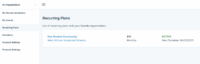
Go to Recurring Plans
Once you are logged in to Donorbox, select “Recurring Plans”, then click on your plan.
Step 3
Update your amount or payment method
Click “change” underneath your amount or payment method, update the information, then select “Update My Card”.
